Crafting Your Dream: The Ultimate Guide to a Stunning White PC Build
Why Go White? The Allure of a Pristine PC Setup
You know, there's just something incredibly satisfying about a white PC build. For ages, the PC landscape was dominated by dark, often black, components. But over the last few years, a quiet revolution has happened, and white builds have truly come into their own. I've always found that a white aesthetic brings a unique sense of cleanliness, modernity, and sophistication to any battlestation or workspace. It's not just about looking good; it's about creating a harmonious, almost artistic, centerpiece that reflects your personal style. Imagine stepping into your room and seeing this brilliant, luminous machine. It just hits different, doesn't it?
A white PC offers an incredible canvas for RGB lighting, too. Unlike darker cases where light can sometimes get absorbed, white components reflect light beautifully, making your chosen RGB schemes pop with vibrant intensity. It's like having a blank slate where every color you introduce gets to truly shine. That's why I think more and more people are gravitating towards this dazzling aesthetic. It provides a crisp, fresh look that stands out in a sea of conventional dark builds, and I honestly believe you're gonna love the end result if you go this route.
Laying the Foundation: Planning Your White PC Vision
Before you even think about buying a single component, we really need to sit down and plan this out. Building a white PC isn't just about picking white parts; it's about cohesion. Trust me, I've seen builds where folks just throw white-ish parts together, and it just doesn't hit that 'wow' factor. We want to aim for seamless integration.
Defining Your Aesthetic and Budget
First, what kind of white are we talking about? Pure bright white, or a slightly off-white, perhaps with silver accents? Decide on your desired aesthetic early on. Do you want a minimalist, almost stark look, or something more flashy with lots of RGB? Your budget is also super important here. While white components used to carry a premium, many mainstream options are now available, but some specialized white GPUs or motherboards can still be a bit pricier. Don't be discouraged, though; there are clever ways to achieve the look without breaking the bank.
- Vision Clarity: What’s your ultimate goal? A showpiece, a sleeper build, or a balanced gaming machine?
- Budget Allocation: Figure out how much you're willing to spend on each core component. This will guide your choices significantly.
- Compatibility Check: Always, always make sure your chosen parts are compatible. PCPartPicker.com is your best friend here.
Essential White PC Components: A Deep Dive
Alright, let's get into the nitty-gritty – the actual parts you'll need. This is where the fun really begins!
The Case: Your White Canvas
This is probably the most obvious and impactful choice. The case sets the entire tone for your build. You'll want a case that's not only white but also offers excellent airflow and cable management options. Many manufacturers like Lian Li (O11 series is a classic for white builds!), NZXT, Corsair, and Fractal Design offer fantastic white cases. Look for tempered glass panels to show off your internal components. I personally adore cases with clean lines and ample space for larger components, especially if you're eyeing a big white AIO cooler.
Motherboard: The White Core
Finding an all-white motherboard can be a bit tricky, but it's becoming easier. Often, motherboards will have white heatsinks, shrouds, or accents on a black or gray PCB. Brands like ASUS (especially their ROG Strix and Prime lines), Gigabyte (Vision series), and MSI have some really attractive options. If a truly white PCB isn't in your budget, a board with significant white accents will still look fantastic, especially once everything else is installed. The shrouds covering the I/O and VRMs are key areas to look for white finishes.
CPU Cooler: Keeping it Chill, in Style
For a white build, an All-in-One (AIO) liquid cooler is often the go-to choice for both aesthetics and performance. You can find AIOs with white radiators, white pumps, and white fans. Corsair's Capellix series, NZXT's Kraken, and Lian Li's Galahad are popular choices that offer brilliant white versions. If you prefer air cooling, there are some stunning white air coolers available from brands like Noctua (Chromax.black.white) or DeepCool, which can look incredibly striking and often perform just as well as AIOs for many CPUs.
Graphics Card (GPU): The White Whale
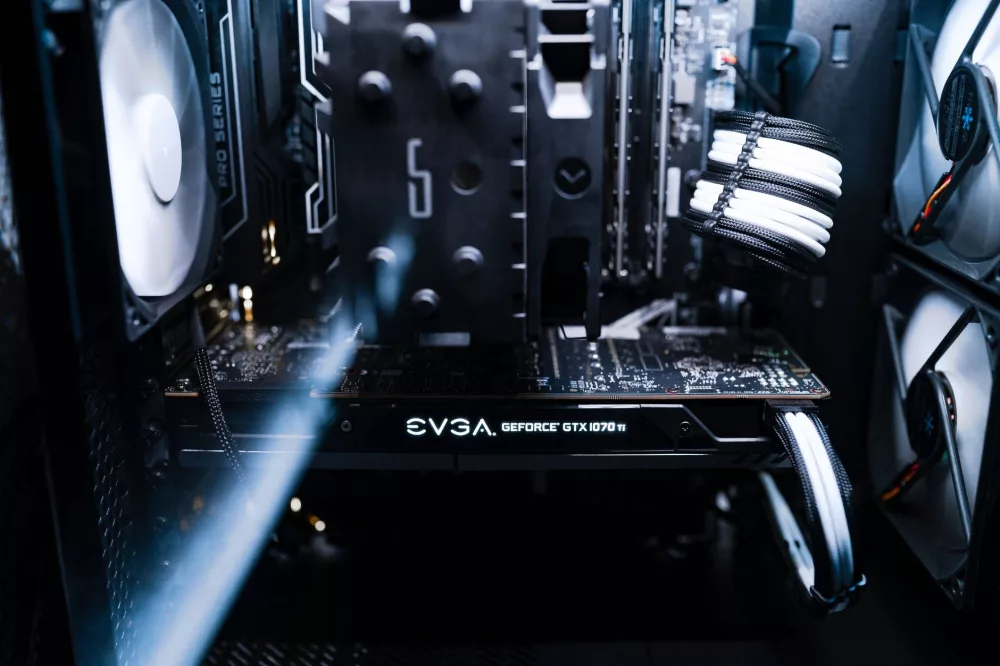
This is often the hardest component to source in pure white, but dedicated white editions do exist! ASUS's ROG Strix White, Gigabyte's Vision series, and even some special editions from Colorful or PNY come in beautiful white finishes. These cards usually feature white shrouds, backplates, and sometimes even white PCBs. If a white GPU is out of your budget or hard to find, don't despair! A black or silver GPU can still look fine, especially if you get a custom white backplate from a third party or focus on white cable extensions to frame it.
RAM: Synchronized White Glow
Thankfully, white RAM kits are pretty common these days. Look for modules with white heat spreaders. Many brands like Corsair (Vengeance RGB Pro SL White), G.Skill (Trident Z Royal White or Neo White), and Crucial (Ballistix White) offer excellent performance with that crisp white aesthetic. If you're going for RGB, white RAM sticks with customizable lighting can really elevate the look.
Storage: Hidden but Harmonious
For most M.2 NVMe SSDs, they'll be hidden under motherboard heatsinks, so their color isn't as critical. However, if you're using a 2.5-inch SATA SSD, you can find white versions. Some NVMe drives even come with white heatsinks, which is a nice touch if visible. Consistency is key, even for the parts you don't see immediately.
Power Supply (PSU) and Cables: The Unsung Heroes
Most PSUs are black, and that's totally fine since it's usually tucked away. What *is* important for a white build are your cables! Custom white PSU cable extensions are an absolute must-have. They make an enormous difference in the overall aesthetic. Brands like CableMod offer high-quality braided white cables in various lengths and styles. This single upgrade can transform a good-looking build into an amazing one.
Fans: Airflow and Illumination
White case fans with white frames and blades are readily available from manufacturers like Lian Li (SL/AL series), Corsair (LL/QL series), and NZXT (Aer RGB). Many of these also come with RGB lighting, allowing you to fine-tune your internal glow. Make sure to get enough fans for optimal airflow, and plan their placement carefully for maximum visual impact and cooling efficiency.
Peripherals: Completing the Ecosystem
Don't forget your peripherals! A white keyboard, mouse, headset, and even a white monitor can tie the whole setup together beautifully. Many companies offer white versions of their popular gaming peripherals, so you won't have to sacrifice performance for aesthetics here.
Illuminating Your Build: RGB and White Harmony
RGB lighting truly shines (pun intended!) in a white build. The white surfaces act as natural diffusers and reflectors, making colors incredibly vibrant. I usually recommend sticking to a consistent lighting scheme. Soft pastels like light blues, pinks, or purples look incredibly elegant against white. Alternatively, you can use vibrant single colors to create a striking accent. Experiment with different modes and colors in your motherboard's or component's RGB software to find what you like best. Don't be afraid to try some contrasting colors like a sharp red or electric blue for a bold statement.
Assembly Tips for a Pristine Finish
Building a white PC requires a little extra attention to detail. Cable management is paramount. Every visible cable should be neatly routed and tied down. Use white cable ties or Velcro straps. Take your time, plan your routes, and don't rush. Wipe down components as you install them to avoid fingerprints and dust. When you're dealing with a white canvas, every little smudge or stray cable really stands out, so precision is key. A clean build looks professional and performs better, too!
Keeping It Pristine: Maintenance
Just like a white car, a white PC needs a little more care to stay looking its best. Regular dusting is crucial. I like to use compressed air frequently to keep dust from accumulating on fans and radiators. Gently wipe down exterior surfaces with a microfiber cloth to prevent smudges. If you've invested in custom white cables, make sure they stay clean. A little bit of proactive maintenance goes a long way in preserving that fresh, clean aesthetic.
Building a white PC is a rewarding experience. It's an opportunity to create a truly personalized and visually stunning machine that performs as well as it looks. With careful planning and attention to detail, you'll end up with a setup that you're not just proud of, but that genuinely inspires you every time you sit down to game or work. Go for it, I'm confident you'll love the outcome!
About Editorial Team
Senior columnist and culture critic specializing in architectural designs, emerging high-growth systems, and contemporary philosophies.
All Categories
Recent Posts